Master the A350 Flight Management System before you step into the simulator.
An interactive trainer for the Airbus A350 MFD, KCCU, ND and EFB, designed by a type-rating flight simulator instructor. Rehearse your preflight setup, route changes and approaches at your own pace, so simulator time stays focused on flying.
Secure online accessOffline APK & EXE on requestiPad & desktopBuilt by an A350 instructor
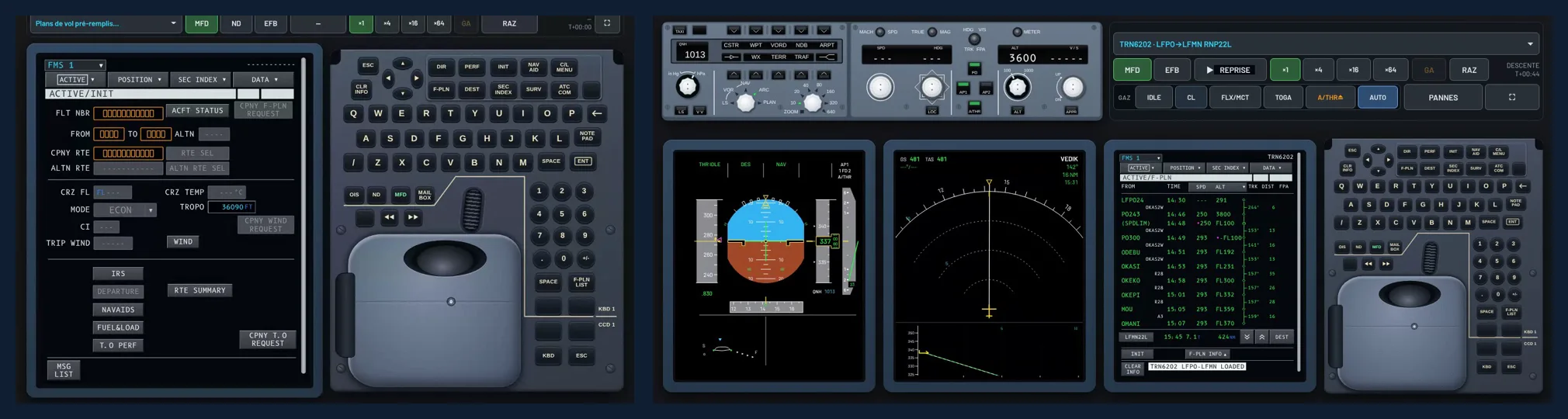
One trainer, two editions
The same FMS logic in two layouts: a focused tablet view for self-study, and a full cockpit view for briefing rooms and instructor-led sessions.
iPad Edition
AvailableA focused layout for tablets and laptops: MFD and KCCU, with the Navigation Display and EFB one tap away.
- MFD pages driven by an on-screen KCCU, trackball cursor included
- Navigation Display following your flight plan
- EFB with take-off and landing performance
- Pre-filled flight plans for quick drills
Cockpit Edition
BetaPFD, ND and MFD side by side with a reproduced glareshield (FCU and EFIS control panels), for a full picture of what the FMS commands. Currently in beta: features are still being added and refined.
- Flight mode annunciator reacting to autopilot and autothrust engagement
- Thrust levers, reversions and alpha floor with aural alerts
- Failure injection for instructor-led scenarios
- Guided exercises, including an RNP AR approach
A220 FMS Trainer
In developmentA dedicated trainer for the Airbus A220 integrated avionics (Collins Aerospace Pro Line Fusion): flight management pages, flight plan editing, performance initialisation, lateral and vertical revisions and holding patterns.
What you can practise
FMS pages, formats and colours modelled on the A350 FCOM, with a flight model that flies your flight plan.
Preflight initialisation
INIT, FUEL & LOAD, PERF (T.O to GA), WIND, company requests and take-off data uplink.
Flight plan management
F-PLN with airways, departures and arrivals, DIRECT TO, HOLD, OFFSET, LL XING and secondary flight plans.
Vertical revisions
Speed and altitude constraints, RTA, cost-index and Mach segments, step altitudes — open them straight from the F-PLN columns.
Navigation & monitoring
POSITION pages (GNSS, IRS, navaids, monitor), ETP, closest airports, fix info and the full FMS message list.
Approaches
ILS and RNP approaches flown with realistic FMA sequences, go-around and re-approach.
Navigation database
Airports, runways, navaids, waypoints and airways to build realistic routes and insert flight plans.
How online access works
The trainer runs on our server and only the display is streamed to your device: nothing to install and nothing to copy.
Request access
Write to us. Instructors and ATOs receive an access code, and can issue temporary codes to their trainees.
Open the trainer
Enter your code in any modern browser on iPad or desktop, then choose the iPad or Cockpit edition.
Train in sessions
Each session is private. If your connection drops briefly, it resumes where you left off.
Standalone offline editions
On requestNeed to train without a connection — in flight, on layovers or in a restricted network? A standalone offline version is available on request for Android (APK) and Windows (EXE), with the full trainer running locally on your device.
Pilots & trainees
OnlineArrive at your FTD or full flight simulator session with your FMS sequences already mastered. Rehearse complex flight plan entries at your own pace, so simulator time stays focused on flying, CRM and non-normal procedures.
ATOs & airlines
LicensingGive your type-rating cohorts a standardised, cost-effective avionics trainer. Multi-seat licensing, trainee code management and alignment with your SOPs are available on request.
Frequently asked questions
Do I need to install anything?
No. The online trainer opens in your web browser on iPad or desktop, with an internet connection during your session.
Can I use it offline?
Yes, on request: standalone offline editions are available for Android (APK) and Windows (EXE). Contact us to receive one.
Which devices are supported?
iPad (Safari) and desktop computers with a recent version of Chrome, Edge, Safari or Firefox. The Cockpit edition is best on a large screen.
Is this an approved training device?
No. It is a familiarisation and self-study tool. It does not replace an approved FSTD, the aircraft manuals or your operator's procedures.
Can an ATO manage access for its trainees?
Yes. Instructors can issue temporary codes with a set validity, and session length can be adjusted to your training programme.
Will other aircraft types be available?
An A220 FMS Trainer is in development. Contact us to be notified when it is released, or if you are interested in another type.
For training only. The A350 FMS Trainer is an independent familiarisation tool. It is not certified, must not be used for flight operations, and does not replace the official aircraft documentation or your operator's procedures. Data and behaviour are simplified. Airbus and A350 are trademarks of Airbus; FC AeroTech is not affiliated with or endorsed by Airbus.
Ready to train?
Request your online access, or ask us about licensing for your ATO or airline.